











































Zoho Sign Keep Documents Moving Towards Signature
Prepare documents and send them to the right people. We configure Zoho Sign templates and signing workflows so your team can see what is complete and what needs action.
We connect signing with your customer and business records, agree how completed documents are stored and handed over, and reduce the need to chase attachments across email.
✓ Implementation & improvement ✓ UK-based senior consultants ✓ Free 30-minute consultation ✓ Clear scope & pricing before work begins
When Signing Creates Delays and Extra Work
Signing delays often begin before a document reaches its reader. Staff copy details into files and recipients may receive the wrong version without a clear order for completion.
We map Sign from preparation to completion. Approved content, recipient roles, reminders and storage follow agreed steps and checks, reducing manual chasing and filing.
Repeated
Document Entry
Staff copy the same details into documents repeatedly, creating avoidable work and opportunities for errors.
Unclear
Signing Order
Unclear recipient roles leave documents waiting while the team checks who should sign or act next.
Manual
Chasing
Staff search emails and chase signatures by hand because outstanding requests are hard to track.
Scattered
Completed Copies
Signed documents and completion evidence sit in different places, making the final record harder to find.
Three Ways We Help With Zoho Sign
You may need your first electronic signing workflow, improvements to an existing setup or a connection to customer and operational records. We start with the document process and agree the scope around it.

Set Up
Zoho Sign

Improve Your
Signing Process

Connect Sign With
Your Systems
Signing Workflows Built Around Your Business
We establish which documents are sent, who prepares them and who signs or approves each step. Then we configure reusable templates, recipient roles and reminders around the way your business works.
Signing Process Design
We define document preparation, recipient roles and completion steps, helping your team manage each signing request consistently.
Templates & Reminders
We configure reusable templates and supported reminders, helping staff issue routine documents without rebuilding every request.
Document Preparation
We organise fields and recipient details around your approved documents, with practical checks before a request is sent for signing.
Business System Connections
We assess CRM and document integrations, helping signed copies and completion details reach the relevant business systems.
Status & Audit Evidence
We organise available status views and audit evidence, helping your team follow up requests and locate the completed signing record.
Training & Handover
We show staff how to prepare requests, check recipients and manage outstanding documents, using examples from everyday work.
A Clear Journey From Document to Signed Copy
The sender should know which document is being issued and what information must be checked before it leaves the business. Each recipient should understand what they are being asked to review and sign.
We organise templates and recipient workflows around that journey, with a clear signing order where needed and agreed storage for completed documents and their audit evidence.

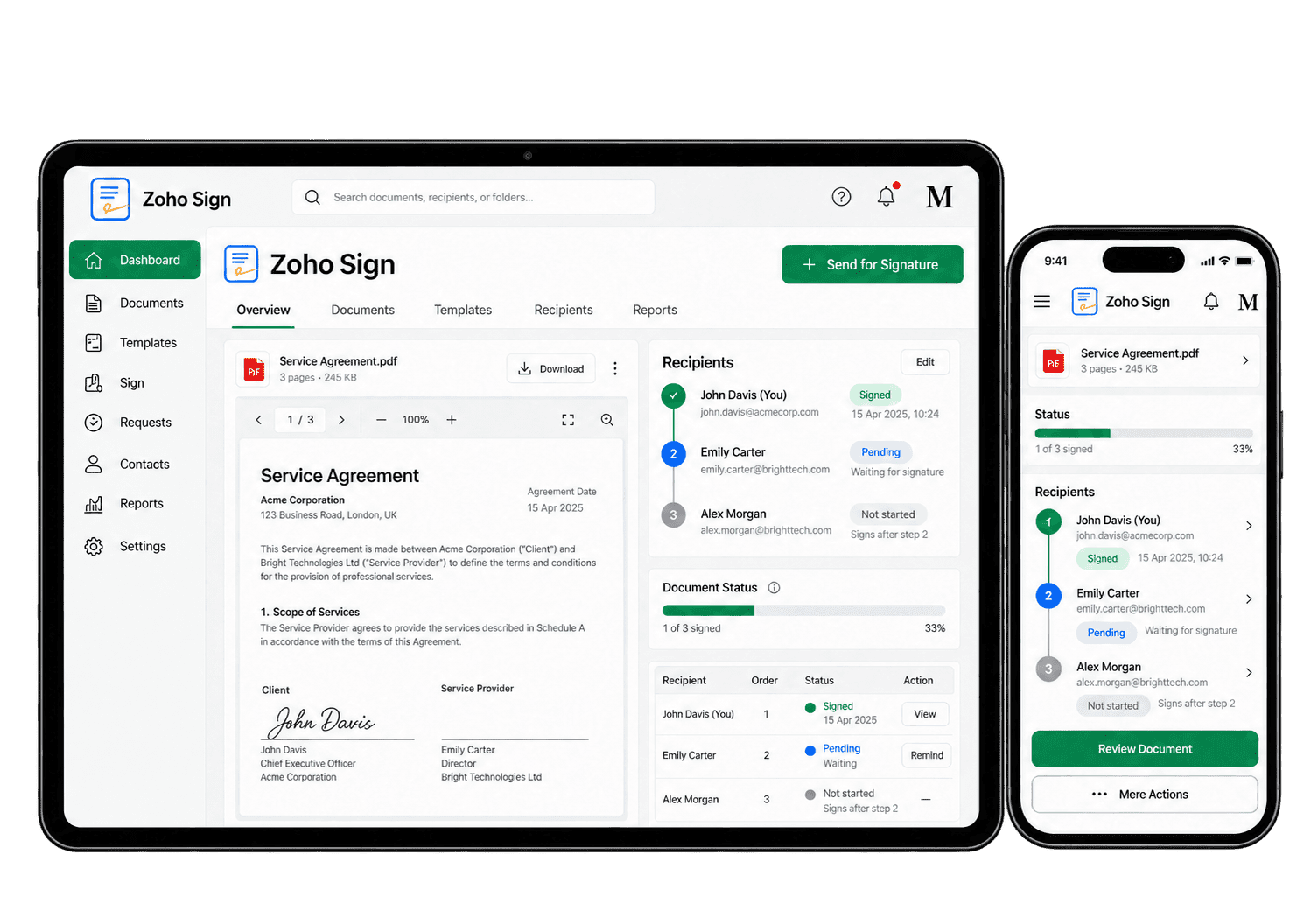
Automate the Routine Steps Around Signing
A routine agreement should not require the same fields and recipient steps to be rebuilt each time. We configure reusable templates and reminders, then assess integrations for document creation and completion updates where they solve a defined need.
-
Reusable templates
-
Recipient details
-
Signing order
-
Automatic reminders
-
Status tracking
-
CRM document flows
-
Completion handovers
-
Audit records
Build routine signing requests from approved templates, with the right fields and recipient roles already in place. We test the document from preparation through completion before asking staff to use it with customers.
- Place the required signature fields.
- Define each recipient's signing role.
- Assign responsibility for template updates.
For example, staff regularly send an approved service agreement. We prepare reusable signing fields and recipient roles, then test the template with the document owner. We check missing fields and signing requirements before use. The owner maintains the approved wording, allowing staff to send the right agreement without rebuilding it each time.
Check recipients and any required identity verification before sending, so agreements reach the people authorised to sign. Correct contact details and recipient responsibilities help avoid confidential documents going to the wrong person.
- Verify names and contact details.
- Confirm each recipient's responsibility.
- Review available identity checks.
For example, an agreement needs an authorised signer rather than the usual customer contact. We agree which details staff must confirm and check the identity options supported by Zoho Sign. A sample request tests the recipient fields. Unclear authority is referred to the document owner before sending.
Set a clear signing sequence using supported options, so each recipient receives the document at the right stage. We confirm which parties sign first and what happens if a document is returned or a recipient cannot proceed.
- Choose sequential or parallel signing.
- Define any necessary approval roles.
- Test the order of recipient requests.
For example, a customer signs an agreement before your business countersigns. We configure the supported signing order and check when each person receives the request. We also test declined and incomplete documents. The owner can identify which signature is outstanding without sending another version of the agreement.
Use available reminder and expiry settings to manage unsigned documents without relying entirely on manual follow-up. The aim is to keep legitimate requests moving without sending unnecessary reminders or chasing expired agreements.
- Agree how often reminders are useful.
- Configure supported automatic reminders.
- Set appropriate request expiry rules.
For example, a service agreement remains unsigned after several days. We set a practical reminder schedule and check how expiry works. Testing confirms what happens when the customer signs or the request expires. The document owner reviews exceptions and decides when a personal conversation is more appropriate.
Review signing progress using the available status views, with a named owner for declined, expired and delayed requests. Teams can then spot exceptions early and follow up with the right recipient instead of checking every request manually.
- Track outstanding and completed requests.
- Identify declined or expired documents.
- Assign responsibility for exceptions.
For example, a customer declines a signing request. We show the document owner how to identify its status and decide the next action. The reason can be reviewed with the customer before any revised agreement is sent. This prevents an unresolved request from being mistaken for a completed contract.
Prepare signing requests from suitable CRM data using supported integration, with accurate recipients and follow-up ownership. We verify the source fields and recipient permissions before sending agreements from a customer record.
- Check supported Zoho CRM connections.
- Agree field and recipient mapping.
- Confirm any integration credit costs.
For example, a sales opportunity requires an approved service agreement. We assess the CRM connection and map the details needed for signing. Testing covers incorrect recipients and incomplete signing. The account owner verifies the document before sending and checks the outcome before progressing the opportunity.
Pass verified signing completion into the next business process through supported connections, with clear ownership and storage. The receiving team should know when a document is complete and where the authorised copy can be found.
- Agree where completed copies are stored.
- Check supported completion actions.
- Test failed and repeated handovers.
For example, a completed agreement allows onboarding to begin. We agree where the signed copy belongs and who receives the next task. We then test successful and failed handovers. The receiving owner confirms the document and task exist before starting delivery, avoiding duplicate or missing actions.
Keep signed documents and available completion evidence accessible to authorised staff under agreed retention rules. We check what evidence is available and who is permitted to access it when questions arise later.
- Review available signing certificates.
- Find the document activity history.
- Agree access and retention arrangements.
For example, a customer asks which agreement was signed and when. The record owner locates the completed document and its available activity evidence. We agree who may access or share these records and how long they are retained. The team can answer the question using the correct signed version.
Know What Is Signed and What Needs Attention
Useful document tracking shows which requests are outstanding, completed, declined or expired. We organise the available views and status information around the work your team needs to follow up, with wider reporting scoped separately.
Outstanding Requests
Review requests waiting for action so the team knows which documents need an appropriate follow-up.
Completed Documents
Locate completed signing requests and confirm where the final copies should be stored in your business.
Declined Requests
Review declined requests and the recorded details before agreeing next steps with each recipient.
Expired Requests
Review requests that have expired and decide whether a new request or an updated document is needed.
Recipient Progress
Use the available recipient status information to understand whose action is needed next in the workflow.
Document Activity
Review the available activity history to understand how a request has moved through the signing process.
Audit Evidence
Keep the completion certificate and audit trail with the signed document for future reference.
Completion Handovers
Assess connected records to check that completed signing requests trigger the agreed next business action.
Connect Signing With the Rest of Your Business
A signed agreement often starts the next stage of work. Sales may need the completion status, HR may need a signed employee document and delivery may need confirmation that work can begin.
We assess supported connections with Zoho CRM, the wider Zoho One suite and your existing document systems. We agree where the signed copy belongs and what action should follow completion, including handling of declined or expired requests.

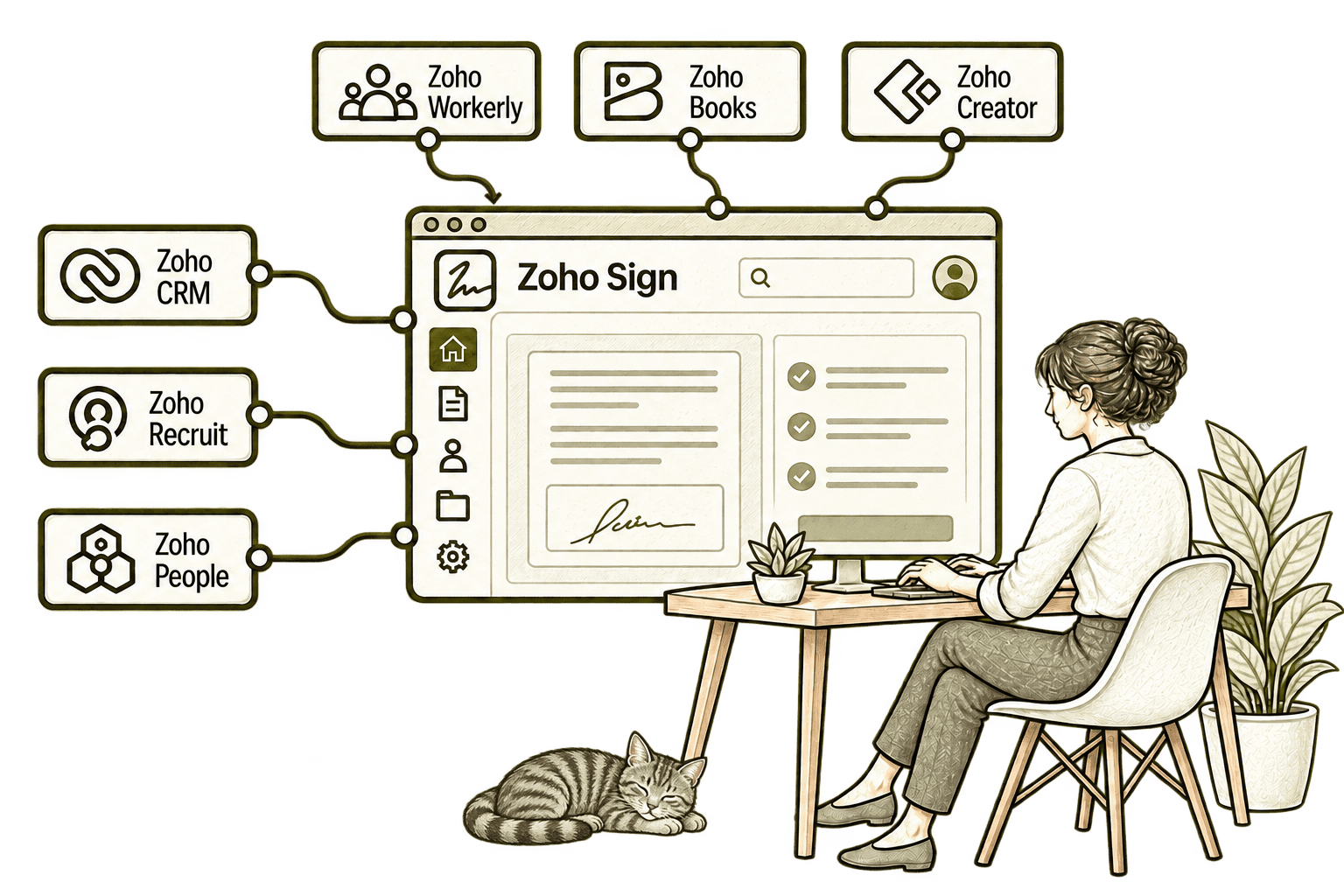
Contracts sent outside CRM are harder to track. Connecting CRM with Sign lets sales request signatures from the customer record and follow document progress alongside the deal.
An emailed offer can leave recruiters chasing signatures. Connecting Recruit with Sign sends hiring documents from the candidate record and tracks progress, making the next hiring step clearer.
Scattered employee agreements make HR follow-up harder. Connecting People with Sign brings signature requests into HR workflows, helping staff track paperwork and keep completed agreements organised.
Unsigned job documents can delay a temporary placement. Connecting Workerly with Sign sends job sheets or offers for signature from the staffing record, helping the team follow their progress.
Unsigned financial documents create extra handling. Connecting Books with Sign lets staff digitally sign supported invoices, estimates or credit notes before sending them to customers.
A custom workflow can stall while staff email documents for signing. Connecting Creator with Sign sends agreed records through a signing workflow, helping the team track the paperwork.
A Better Signing Process Starts With the Design
Whether you are introducing electronic signatures or improving Zoho Sign, we review document preparation, recipient responsibilities and the completion handover before adding automation.
Starting Fresh
We agree the document types, approved content and recipient roles before configuring templates and signing workflows. Your team starts with clear checks and a tested route to the completed copy.
Already Using Zoho Sign
We review templates, recipient steps, reminders and storage to find where signing causes extra work. Useful existing configuration is retained and changes focus on the practical issues.
A Clearer Starting Point
Not sure whether the problem is document preparation, signing or the process after completion? Our Business Systems & Operations Audit helps establish where work is getting stuck.
You receive a practical view of the main issues and recommended priorities, giving you a clearer basis for deciding what to improve next.
What a Zoho Sign Engagement Includes
Discovery & Document Mapping
Agree document types, preparation steps and recipient responsibilities.
Templates & Field Design
Configure reusable templates from your approved document content.
Recipient & Access Setup
Define signing roles, order and the appropriate verification options.
Reminders & Connections
Configure follow-up rules and test the required document handovers.
Completion & Evidence
Agree storage for signed copies and check available audit records.
Training & Optimisation
Help staff manage requests and refine the process after initial use.
The scope depends on your documents, recipient workflows and connections. We confirm plan limits, integration credit usage and authentication options before agreeing the implementation.
Different Businesses. Different Documents.
A consultancy may send service agreements; a recruiter may issue engagement documents; a construction business may collect acceptance of a quote. We configure the signing process around the document and your organisation’s approved requirements.
Configure suitable client engagement and related documents against approved signing, verification and witnessing requirements.
Manage signatures on approved customer or supplier agreements, with completed copies linked to the appropriate commercial records.
Support agreements and authorisations using the roles, signing steps and evidence requirements approved for each document type.
Recruitment & Workforce Agencies
Prepare approved employment documents with clear recipient roles and completed records linked to the relevant HR process.
Configure suitable customer agreements using the identity, signing and retention requirements approved for your business process.
Property & Housing Associations
Support appropriate property and supplier documents, with any execution or witnessing requirements assessed before configuration.
Manage suitable partner, supplier and volunteer agreements, with clear document ownership and access to completed copies.
Collect signatures on suitable quotations and service agreements, with document-specific execution requirements reviewed first.
Why Mason & Co
We combine Zoho implementation with business process design, integration and automation. We look beyond sending a signature request to the document checks, recipient workflow and completed records your team needs.
Senior-led consultancy
Work directly with senior consultants who understand your business process and technical delivery.
UK-based, international delivery
Work with our UK-based team across locations, with delivery planned around your working hours.
Architecture + implementation
Connect business design with practical configuration and integrations that support everyday work.
Zoho + AI + automation
Connect Zoho, AI and automation where they solve a clear problem and improve your daily processes.
Not Sure Whether Mason & Co Is the Right Fit?
Tell us what you want to implement, improve or fix. We will discuss whether we can help and recommend a sensible next step based on what you share.
Your Questions Answered
Can you improve an existing Zoho Sign setup?
Yes. We review templates, recipient roles, reminders, document status and connected records. We retain useful work and prioritise changes that make preparation, signing and follow-up clearer.
Do we need Zoho One to use Sign?
No. Zoho Sign can be used as a standalone application. We assess the plan and integrations you need; the wider Zoho One suite can be considered separately if several applications are required.
Can you create reusable document templates?
Yes. We configure templates from your approved documents, placing the required fields and defining recipient roles. We agree who maintains the content and test the template before it is used for live signing.
Can Sign connect with Zoho CRM and other systems?
Yes. We assess the supported Zoho Sign and Zoho CRM integration against your workflow. Other systems may use supported APIs or middleware, with document mapping, completion updates and credit usage confirmed first.
Can you configure reminders and recipient verification?
We assess the reminder and recipient-verification options available in your plan. We configure them against your agreed document requirements and confirm any extra charges before implementing the workflow.
How long does a Zoho Sign implementation take?
Timing depends on the number of document templates, recipient workflows and integrations. We agree the approved source documents and required checks first, then provide a delivery plan based on that scope.
Is electronic signing suitable for every document?
Suitability depends on the document, jurisdiction and any signing or witnessing requirements. We configure the workflow against your organisation’s approved requirements and can coordinate with your legal or compliance team; the software setup alone does not determine validity.
Where Are Document Signatures Slowing Work Down?
Tell us which documents need signatures and how they move through your business. We will help assess Zoho Sign and identify the templates, signing steps and application connections that need attention.
30 minutes. No charge. No obligation.